Annotation Lines
Icon
Function
Annotation lines are used to draw lines or illustrate connections on any canvas.
Tip
Annotation lines are commonly used to sketch system diagrams on the root canvas.
Setup Method
-
Create: Drag the component onto the canvas.
-
Connect: Drag the endpoints to connect to the target object.
-
Add text in lines: Double-click the annotation line to edit the text.
-
Set Style:
-
Set the line style through the control bar.

-
The icons on the control bar, from left to right, represent the following:
- Line Type
- Color
- Path Style
- Line Style
- Left Arrow
- Right Arrow
-
Example
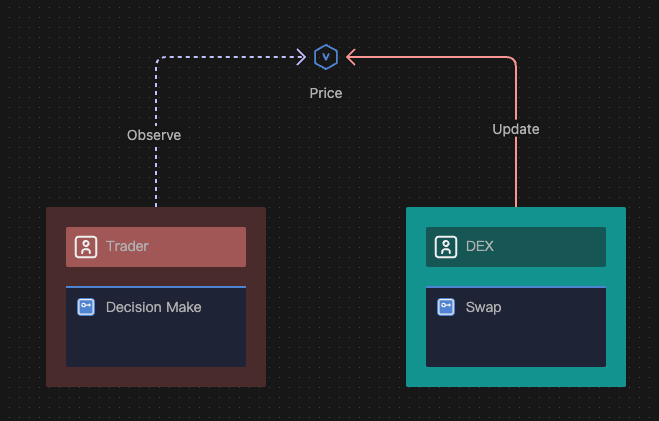
Annotation lines are used in a basic trading model to effectively represent the interactions between the agents (trader and DEX) and the data component (Price).